
The Corporate Live Streaming Guide
Professional Live Streaming for Conferences, Meetings and Hybrid Events
Livestreaming is familiar enough to look simple.
Most people have streamed from a phone, joined a Zoom meeting or watched an event online. That familiarity can create the impression that a professional livestream is simply a larger version of the same thing.
It is not.
We once had a client contact us a week before an event. They wanted to add a remote presenter who could communicate live with someone onstage. The conversation needed to feel seamless for the audience in the room and the audience watching online.
They believed we needed to add another laptop.
We needed quite a bit more than another laptop.
A professional livestream combines elements of live event production, television production and information technology.
Cameras, audio, graphics, presentation content, internet infrastructure, streaming platforms and remote contributors all have to work together in real time.
That does not mean every livestream needs to be enormous or expensive. It means the production should be designed around what the broadcast needs to accomplish.
Livestreaming sits at the crossroads of IT, video production and live events.
An experienced partner needs to understand all three.
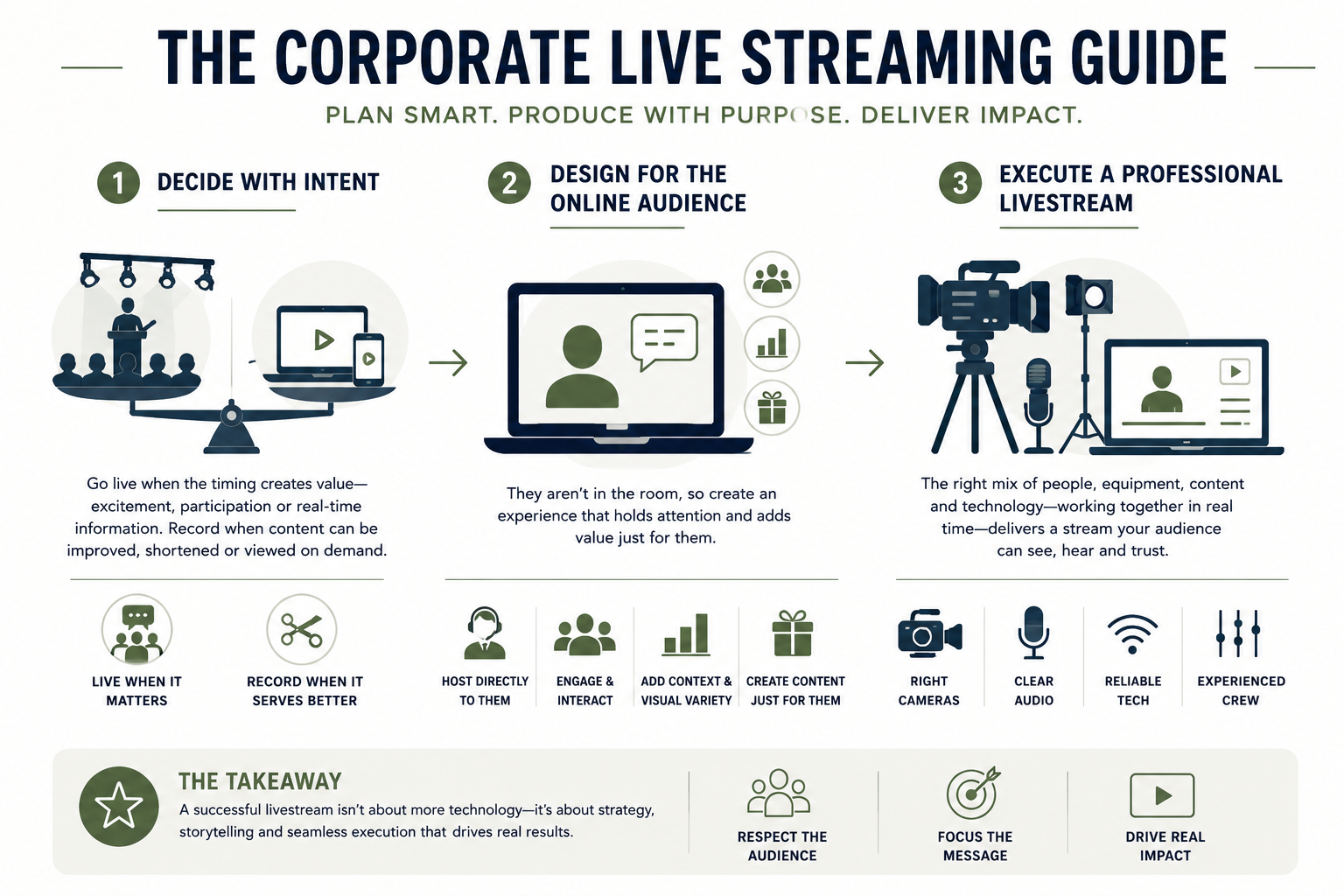
The first question: Does it need to be live?
There are countless reasons to livestream an event. Executive town halls, conferences, product announcements, training programs, shareholder meetings, fundraisers and competitions can all benefit from reaching people who cannot attend in person.
But before discussing cameras or platforms, ask a more fundamental question:
Does this need to be seen right now?
That standard holds up surprisingly well.
A livestream makes sense when a remote audience needs to experience something as it happens. The timing might create excitement. Viewers may need to participate, vote, ask questions or receive information at a particular moment. The live nature of the event may be part of its value.
Sometimes, however, recording the event is the better decision.
Recorded content can be edited, tightened and divided into shorter segments. Mistakes can be removed. Graphics can be improved. Viewers can watch when it is convenient for them. In many cases, a company can spend less money and create a more useful final product by recording, editing and publishing the content later.
Live is valuable when being live matters.
If it does not matter, do not pay for it simply because livestreaming feels like the expected thing to do.
A livestream is not the in-room event
One of the most important things to understand about livestreaming is that the online audience cannot have the same experience as the audience in the room.
They are not walking into the venue. They cannot feel the energy of the crowd or hear the conversations happening around them. They do not see what is outside the camera frame. They are probably watching on a laptop while email, text messages and the rest of the internet compete for their attention.
Trying to recreate the room perfectly is impossible.
The better approach is to build an experience that works for the person watching online.
That might include:
- A host speaking directly to remote viewers
- Online discussion groups
- Livestream-only giveaways
- Polls and moderated questions
- Interviews during in-room breaks
- Graphics that provide additional context
- Shorter segments and more frequent visual changes
- Content created specifically for the remote audience
Not every stream needs all of these features. A required corporate update may need to be direct and straightforward. A public brand event may benefit from energy, interaction and entertainment.
The point is to make the decision intentionally.
When the in-room experience does not translate, do not force it.
Create something better for the audience you actually have.
Why one wide camera is rarely enough
Everyone has seen the livestream with one wide shot from the back of the room.
The speaker looks tiny. Slides are difficult to read. Audience questions cannot be heard. Nothing changes visually for long stretches of time.
The only people who continue watching are usually the people required to remain logged in. Even then, their cameras are off and we all know what that means.
They are technically present.
They are not paying attention.
A professional stream gives viewers visual information that helps them follow the program. That may include a wide camera showing the room, a tighter shot of the speaker, an angle for conversations or demonstrations, presentation slides, videos, graphics and audience reactions.
Here is the good news. Once the infrastructure and crew needed for a dependable stream are in place, adding production value may cost less than clients expect. Another camera, a presentation feed or well-designed graphics can dramatically improve the experience without dramatically changing the budget.
The expensive part is creating a reliable broadcast environment.
Once you have built it, give people something worth watching.
What a professional livestream actually involves
A livestream is not one technical service. It is a collection of systems and people working together.
Cameras and video direction
The number and placement of cameras should support the content. A keynote may only require a few well-chosen angles. A panel discussion, demonstration or live competition may require considerably more.
Someone also has to direct those cameras and decide what the audience sees at every moment. Good switching feels natural. The viewer sees the right person, slide or reaction without thinking about how it happened.
Audio
Viewers will forgive an imperfect camera angle long before they forgive bad audio.
The stream needs a clean audio feed that has been mixed for the online audience. That may not be identical to what sounds good in the room. Remote presenters, videos, audience questions and walk-up music must all reach the stream at the correct level.
Audio is not one part of the livestream.
For the viewer, audio is the livestream.
Presentations and video playback
If someone in the room can see a presentation, the online audience probably needs to see it too. That requires more than pointing a camera at a projection screen.
Presentation decks and videos should be brought directly into the broadcast. Depending on the program, viewers may see the speaker, the presentation or a designed combination of both.
These decisions should be made during pre-production, not discovered while the CEO is walking onstage.
Lighting
Lighting designed only for the room may not look good on camera. A stage can feel bright and polished to the audience while faces appear dark or uneven in the stream.
The event and streaming teams should plan lighting together so the room feels good in person and the speakers look good online.
Graphics
Names, titles, schedules, holding slides and branded transitions give viewers context. They also help the stream feel intentional during breaks, delays and changes in the program.
Good graphics do not need to overwhelm the content. They simply help the viewer understand what is happening.
The production team
Cameras do not direct themselves. Presentations do not appear at exactly the right moment without an operator. Remote presenters do not enter a program seamlessly because someone clicked a link.
Depending on the scope, a livestream may require a director, technical director, camera operators, an audio engineer, a graphics operator, a playback or presentation operator, a streaming engineer and a producer coordinating the entire broadcast.
That can surprise clients who are accustomed to joining online meetings.
A meeting platform connects people.
A production team creates a broadcast.
Remote presenters add more than another laptop
Bringing a remote presenter into a live event is entirely possible. We do it regularly.
It also introduces several layers of communication.
The remote presenter needs to see and hear the appropriate people in the room. The onstage presenter may need to see and hear the remote participant. The audience in the room needs to experience the conversation naturally. The streaming audience needs a clean combination of both participants.
Meanwhile, the production team needs a way to communicate privately with the remote presenter, prepare them to enter the program and troubleshoot without broadcasting those conversations to the audience.
There may also be delay, presentation control, confidence monitors and return video to consider.
None of this is impossible.
It just is not another laptop.
Remote presenters should be tested in advance using the same internet connection, computer, microphone and camera they plan to use during the event. They should also receive clear guidance about lighting, framing, clothing, audio and what will happen before they go live.
Most production problems do not begin during the broadcast.
The broadcast is simply when everyone can see them.
Livestream reliability is a spectrum
Every livestream should be dependable, but reliability does not mean the same thing for every event.
A voluntary program with a peak audience of 200 has a different risk profile from a financial presentation delivering required information to 5,000 voting members. A public competition has different requirements from an internal meeting that will also be recorded and distributed later.
Before building the system, we ask:
- How many viewers are expected?
- How important is the content?
- What happens if the stream is interrupted?
- Does the audience need to participate?
- Are there legal, financial or compliance requirements?
- Will the event also be recorded locally?
- How quickly must service be restored if something fails?
The answers determine the appropriate level of redundancy.
A high-stakes broadcast might include dedicated internet service, a backup internet connection, redundant encoders, backup recordings, replacement equipment and multiple paths for critical audio and video signals.
A lower-risk stream may not require every one of those safeguards.
Reliability should be designed around consequences, not fear.
A company that promises every stream is completely fail-proof is not being honest. Internet providers can experience outages. Platforms can fail. Equipment can malfunction.
The goal is to identify the credible points of failure, reduce their likelihood and have a real plan for what happens next.
“Don’t worry, we’ve done this before” is not a contingency plan.
Internet deserves its own conversation
A venue saying it has Wi-Fi does not tell us whether it can support a professional livestream.
Streaming requires a stable, dedicated connection with sufficient upload speed. That last part matters. Most people think about download speed because that is what they use at home. A livestream is sending video out of the venue, so upload performance is critical.
The production team should coordinate with the venue or internet provider early. We need to know how the service is delivered, whether bandwidth is dedicated, where the connection is located and what backup options are available.
This can become expensive when it is handled late.
If livestreaming is part of the event from the beginning, internet requirements can often be discussed while venues are still competing for the business. Once the contract is signed and event week is approaching, the client has far less leverage.
Technology problems are often planning problems wearing a headset.
Choosing a streaming platform
Platform selection does not always need to be complicated.
If a company already operates within Microsoft Teams and the audience needs to participate, Teams may be the practical choice. If the organization uses Zoom, Zoom can serve a similar purpose.
If the audience does not need to speak or appear on camera, YouTube is remarkably reliable and can serve very large audiences. Vimeo and other platforms can provide additional presentation, privacy and branding options.
A dedicated streaming platform or custom webpage may be appropriate when the event requires:
- Registration or authenticated access
- Detailed viewer analytics
- Continuing education tracking
- Voting or other participation
- Multiple simultaneous sessions
- Sponsor integration
- Custom branding
- Greater control over the viewing environment
- Connections to other company systems
The platform should follow the requirements.
A more elaborate platform does not automatically create a better event. It only creates value when its features support something the audience or organization actually needs.
Engagement is not a platform feature
Polls, chats and virtual breakout rooms can be useful. They do not automatically make content engaging.
A boring presentation with a chat box is still a boring presentation.
Remote viewers need clear ideas, strong speakers, good pacing and visual variety. They need to understand why the content matters and what they should do with it.
Long housekeeping announcements, dense presentation slides and speakers reading prepared text tend to perform poorly online. Extended in-room breaks can also create dead space unless the streaming audience receives other programming.
Sometimes the answer is additional content. Sometimes it is simply tighter planning.
The most useful engagement question is not, “Which interactive feature should we add?”
It is, “Why would someone keep watching?”
Bring in the production partner immediately
If livestreaming is being considered, bring the production partner into the conversation as early as possible.
We have met very few companies that were fully prepared to produce a professional stream without outside help. The exceptions usually have substantial internal IT and media departments with a proven history of working together.
Even then, an external production partner may be needed to connect those teams with the live event.
Early involvement allows the production company to help determine:
- Whether livestreaming is the right format
- How the remote audience should experience the event
- Which venue and rooms can support the production
- What internet service is required
- Which platform fits the audience
- How remote presenters will participate
- What cameras, audio and lighting are needed
- How the stream will be tested
- What should happen if a system fails
- How the content can be repurposed afterward
Adding livestreaming late can affect the room layout, stage design, lighting, labor, internet order and production schedule. It can also turn decisions that should have been strategic into expensive emergency purchases.
Early planning does not always increase the budget.
Often, it is what protects it.
For a broader look at when production decisions should happen, see our Corporate Event Planning Timeline.
Rehearsal matters online too
A livestream rehearsal should test more than whether the cameras turn on.
It should confirm the entire path from the stage to the viewer. Presentations, videos, graphics, microphones, remote presenters, platform access, audience interaction and backup systems should all be tested.
Whenever possible, someone should watch the rehearsal as an actual remote viewer. The production team may know that every signal is reaching the control room, but the viewer’s experience is what matters.
Can they hear every participant?
Can they read the slides?
Do transitions make sense?
What do they see during a break?
Do they know how to participate?
The stream is the product.
The control room is simply where it is made.
Recording extends the value
Even when being live is essential, the content should usually be recorded.
A local recording provides more security than relying solely on the platform’s recording. It can also produce better-quality files for editing after the event.
One livestream can become:
- Full on-demand sessions
- Individual keynote videos
- Short educational segments
- Social media clips
- Internal training content
- Promotional highlights
- Speaker reels
- Sponsor content
This does not mean every minute needs to be preserved forever. It means the post-event plan should be considered before the event.
If the content will be edited later, certain graphics, camera angles and isolated recordings may need to be captured during the broadcast. Planning for those deliverables in advance is much easier than trying to rebuild them afterward.
A live competition needs a real broadcast
Our work with the BarArts team has included bringing Masters of the Craft to a remote audience. The program is a bartender and culinary competition held across North America, with finalists coming together in Washington, D.C. for the finals.
The event was technically demanding, but it was also a lot of fun.
A competition needs more than documentation. Viewers need to understand what is happening, meet the competitors, see the details and feel some of the energy in the room. Cameras, audio, graphics, timing and production direction all contribute to the story.
Even with extensive livestreaming experience, we continue to receive requests for ideas we have never executed in exactly the same way.
That is part of the work.
Experience should not make a production company rigid. It should give the team enough understanding to build something new without losing control of the fundamentals.
A practical livestream planning checklist
Before approving a streaming plan, confirm:
- Why the event must be live
- Who the remote audience is
- What remote viewers need to see, hear and do
- Whether the livestream needs unique content
- Which platform will be used
- How viewers will access it
- How many viewers are expected
- What cameras and presentation sources are included
- How audio will be mixed for the stream
- Whether remote presenters are involved
- What internet service is being provided
- What backup systems are appropriate
- When the full stream will be tested
- Whether the event will be recorded locally
- What content will be delivered after the event
- Who has final authority during the broadcast
A good production partner should be able to explain each answer in plain language.
Complex production may require sophisticated technology.
It should not require vague explanations.
The real goal of livestreaming
A successful livestream is not simply a signal that remained online.
It is a communication experience that reached the people who needed it, when they needed it, in a way that kept them connected to the message.
Sometimes that calls for a straightforward executive presentation.
Sometimes it calls for multiple cameras, remote contributors, audience interaction and broadcast-level redundancy.
The scale changes.
The responsibility does not.
The online audience is still your audience. They deserve more than a wide camera in the back of the room and a link that technically works.
A livestream is not an event with a camera attached.
It is another event happening at the same time.
That is why the right partner makes all the difference.
Learn more about Five Stone Creative’s professional live streaming services for corporate meetings, conferences, hybrid events and live broadcasts in Dallas-Fort Worth and nationwide.